前言
接續上一篇同步非同步霧煞煞(上)-AJAX,這篇會介紹Callback hell, promise, Async, Await
Callback hell 回呼地獄
上一篇提到有非同步特性方法像是Ajax, setTimeout等,當我們使用這些有非同步特性方法,但又希望可以按照我們想要的順序來執行時,一種解決方式是用callback function
DEMO
setTimeout的延遲時間為隨機秒數,非同步的特性無法控制哪個setTimeout先執行,把setTimeout個別用 function包起來,且各個 function 都帶入一個 callback 參數。B為A的callback,C為B的,但是如果有太多函式要依序就會變成callback hell,導致程式碼過巢會很難閱讀。
1
2
3
4
5
6
7
8
9
10
11
12
13
14
15
16
17
18
19
20
21
22
23
24
25
26
27
| function funcA(check){
setTimeout(function(){
console.log('A');
check('A');
}, Math.random() * 1000);
}
function funcB(check){
setTimeout(function(){
console.log('B');
check('B');
}, Math.random() * 1000);
}
function funcC(check){
setTimeout(function(){
console.log('C');
check('C');
}, Math.random() * 1000);
}
funcA(function(){
funcB(function(){
funcC(function(){
});
});
});
|
Promise
早期也有另一個方式是generator,但很少人這樣做。而現在最多人使用的則是Promise來解決常見的非同步問題:
- Callback hell
- 寫法不一致(promise用.then來回呼)
- 無法同時執行無法同時執行(jQuery有並行寫法但不直覺)
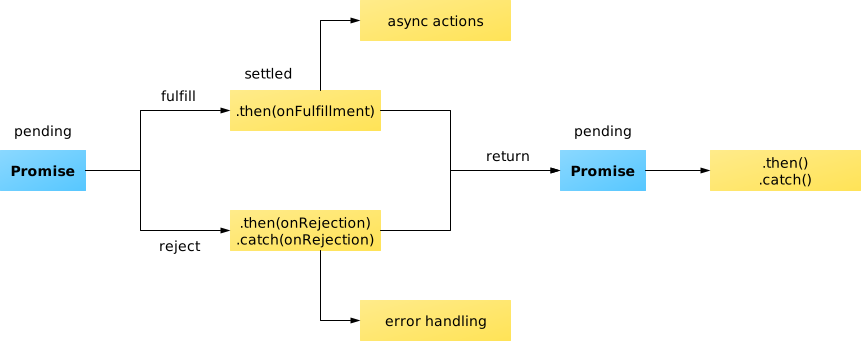
Promise 可能處於三種階段中任意階段:
Pending:正在進行中,還不知道是完成或失敗
Resolved(Fulfilled):表示成功,回傳結果
Rejected:表示失敗,回傳失敗原因
1
2
3
4
| const newPromise = new Promise((resolve, reject) => {
resolve(someValue);
reject('失敗原因');
});
|
then()、catch()、finally()
在function使用promise功能,return一個 promise 物件即可,then()接收成功,catch()接收失敗,finally()非同步執行完畢(無論是否正確完成):
1
2
3
4
5
6
7
8
9
10
11
12
13
14
15
16
17
18
19
20
21
| function promiseFunction(timeout) {
return new Promise((resolve, reject) => {
setTimeout(() => {
resolve('成功');
},timeout);
if (timeout === 0){
reject('失敗');
}
});
};
promiseFunction(1000).then((response) =>{
console.log('執行成功', response);
}).catch((error)=>{
console.log('執行失敗', error);
});
|
Promise Chain
要串連執行多個 promise 功能的話,則用then()來連結,若其中一個沒成功則會跳到失敗。
1
2
3
4
5
6
7
8
9
10
11
12
13
| promiseFunction(1000).then((response) =>{
console.log('執行成功', response);
return promiseFunction(2000);
}).then((response) =>{
console.log('執行成功2', response);
return promiseFunction(3000);
}).then((response) =>{
console.log('執行成功3', response);
})
.catch((error)=>{
console.log('執行失敗', error);
});
|
用promise解決上面callback hell的demo
1
2
3
4
5
6
7
8
9
10
11
12
13
14
15
| function promiseFunction(func) {
return new Promise((resolve, reject) => {
func(function(){
resolve();
})
});
};
promiseFunction(funcA).then(()=>{
return promiseFunction(funcB);
}).then(()=>{
return promiseFunction(funcC);
}).catch((error)=>{
console.log('執行失敗', error);
});
|
Promise.all()
如果funcA, funcB, funcC 的先後順序不重要,直到這三個函式都回覆成功或是其中一個跳失敗 才可以繼續後面行為,可以透過 Promise.all() 來做到:
1
2
3
4
| Promise.all([promiseFunction(funcA), promiseFunction(funcB), promiseFunction(funcC)])
.then((response) =>{
console.log(response);
});
|
適合需要多支 API 要一起執行,並確保全部完成後才進行其他工作時。
Promise.race()
同時執行多支API,但僅會回傳最快回應的結果
1
2
3
4
| Promise.race([promiseFunction(funcA), promiseFunction(funcB), promiseFunction(funcC)])
.then((response) =>{
console.log(response);
});
|
Async、Await
async await 是ES7的語法,搭配Promise來使用,寫法更精簡閱讀起來更簡單,像是在讀同步程式碼,兩者必須一起使用
使用 async function
定義一個非同步函式,讓這個函式本體是屬於非同步,但其內部以“同步的方式運行非同步”程式碼。
1
2
3
4
5
6
7
8
9
| async function asyncFn() {
return data
}
console.log(asyncFn());
asyncFn().then(r => {
console.log(r)
});
|
await
可以暫停非同步函式的運行(中止 Promise 的運行),直到非同步進入 resolve 或 reject,當接收完回傳值後繼續非同步函式的運行。
1
2
3
4
5
6
7
8
9
10
11
12
13
| function promiseFunction(func) {
return new Promise((resolve, reject) => {
func(function(){
resolve();
})
});
};
(async function () {
await promiseFunction(funcA);
await promiseFunction(funcB);
await promiseFunction(funcC);
})();
|
try…catch
用try和catch來處理成功和失敗
1
2
3
4
5
6
7
8
9
10
11
12
13
14
15
16
17
18
| function promiseFunction(func) {
return new Promise((resolve, reject) => {
func(function(){
reject('失敗');
})
});
};
(async function () {
try{
await promiseFunction(funcA);
await promiseFunction(funcB);
await promiseFunction(funcC);
}
catch(error){
console.log(error);
}
})();
|
回傳不同錯誤訊息
1
2
3
4
5
6
7
8
9
10
11
12
13
14
15
16
17
| (async function () {
try{
await promiseFunction(funcA);
} catch(error){
console.log('A', error);
}
try{
await promiseFunction(funcB);
} catch(error){
console.log('B', error);
}
try{
await promiseFunction(funcC);
} catch(error){
console.log('C', error);
}
})();
|
搭配 Promise.all()
1
2
3
4
5
6
7
8
9
| (async function () {
try{
const data = await Promise.all([promiseFunction(funcA), promiseFunction(funcB), promiseFunction(funcC)]);
console.log(data);
}
catch(error){
console.log(error);
}
})();
|
Fetch搭配Async、Await
fetch 也是基於 Promise 的 Web API,因此它也同樣能夠使用 async/await 來進行改寫,fetch 與一般 AJAX 套件比較不同之處是在 JSON 回傳後,必須在使用 json() 的方法將資料輸出成 JSON 格式(相關介紹可以參考:MDN Fetch)。
當使用 Promise then 時,則會使用 return 來呼叫 json() 方法(箭頭函式縮寫,所以省略了 return),
1
2
3
4
5
6
7
8
9
10
11
12
13
14
15
16
17
18
19
20
| const url = 'https://randomuser.me/api/';
fetch(url).then(response => response.json())
.then(data => console.log(data))
.catch((err) => {
console.log('錯誤:', err);
const url = 'https://randomuser.me/api/';
(async function(){
try{
const response = await fetch(url);
const data = await response.json();
console.log(data);
}
catch(error){
console.log(error);
}
})();
|
![[JS] 同步非同步霧煞煞(下)-Promise,Async,Await](/gallery/003.jpeg)